Web UI: a heuristic review for a first-time user
Status: review written 2026-10-21 against main at v0.2.0-rc.2+, before the work it proposes; the last section says
what was built from it and what was not.
Why: the first outside validation (report) called the Web UI "maximally non-intuitive", said daily work stays in the CLI, and listed too many new words (proposal, attestation, provenance, lease, fencing). This page is the written review the roadmap asks for: five jobs walked in the real UI, findings ranked by severity, the information architecture and vocabulary we propose, and the target flows.
Method
The real ag-server with the embedded UI and the end-to-end demo world (npm run demo:server in apps/web: an
admin, a writer, a reviewer, an integrator, a reader, four agents, an empty repository, a repository with blocked
proposals). Chromium at 1280x860, signed in with the admin token and with the reviewer's and writer's credential. The
reviewer pretended never to have read the docs and followed only what each screen offered, for five jobs:
- start a repository, 2. give an agent work, 3. review a change, 4. unblock a blocked change, 5. land it.
The screens below are the "before" state (docs/design/web-ux-review/before-*.png).
What already works (keep it)
- One real design system, both themes, axe-clean, keyboard and phone layouts. Nothing here is visual polish work.
- The proposal page already states why a change is blocked, in sentences, with a remedy line, and already keeps the four verdicts separate. The review is about everything around it.
- The server's permission checks are mirrored in the UI (
lib/roles.ts), so "only actions this role may do" is already computable.
Findings, ranked
Severity: S1 a first-time user cannot finish the job or gives up; S2 finishes with help from the docs or by guessing; S3 friction.
S1-1. The landing page is a list of repositories, not a list of what needs me
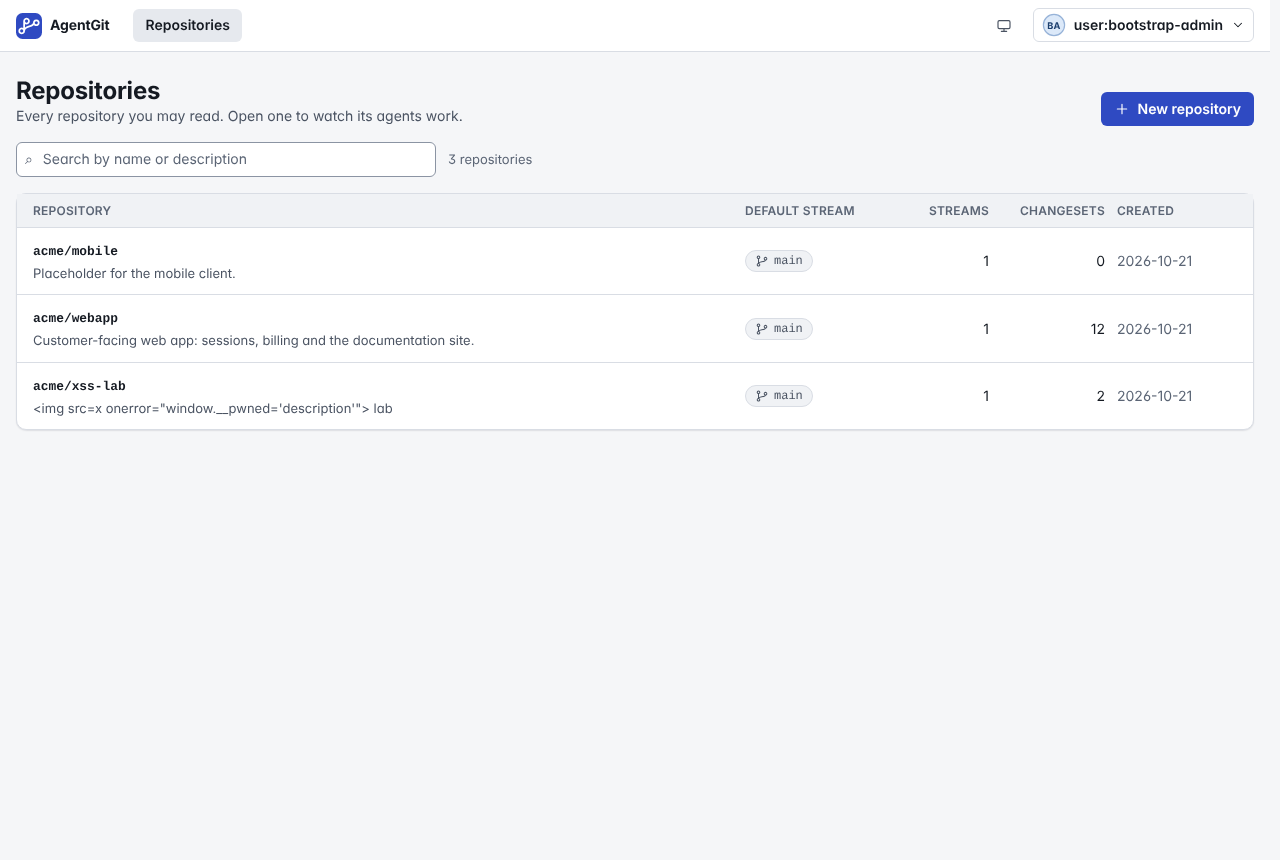
After sign-in the first thing is a table with Streams and Changesets columns (screen). Nothing says that three changes are blocked, that one needs my review or that an agent has been silent for four minutes. That information exists, one repository down, on a board that is itself an inventory (six counters, four panels). Jobs 3 and 4 start with "find the thing", and the UI does not help find it.
S1-2. The vocabulary is the engine's, undefined on the screen
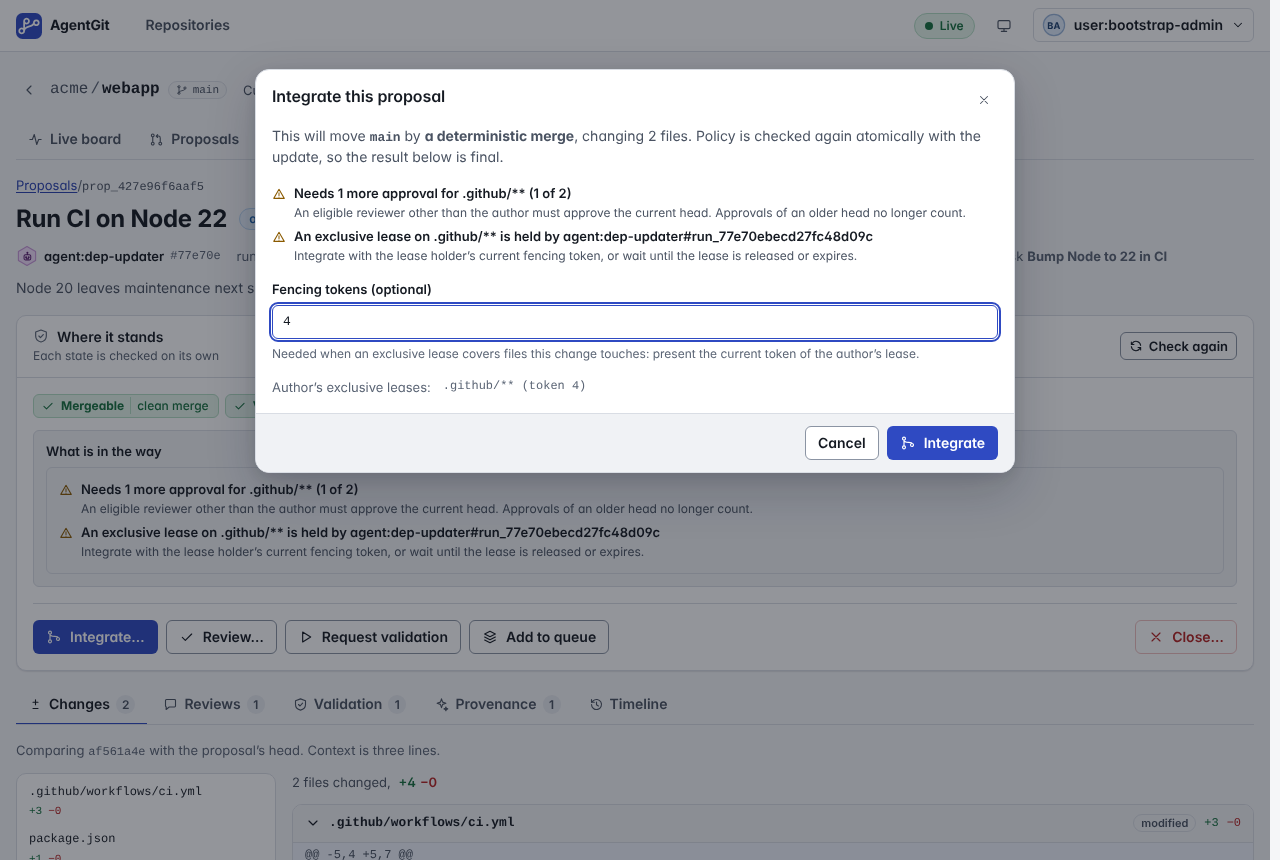
"Fencing tokens (optional)" in the land dialog (screen), "exclusive lease", "Provenance", "Validation", "attestation", "stream", "Integrate", "Mergeable / Validated / Approved / Integrated" appear bare. A tooltip exists in the component set but is used on none of these. The reviewer's own phrase: too many new concepts at once. A person must learn eight nouns before a button makes sense.
S1-3. A blocker tells you the fix but does not let you do it
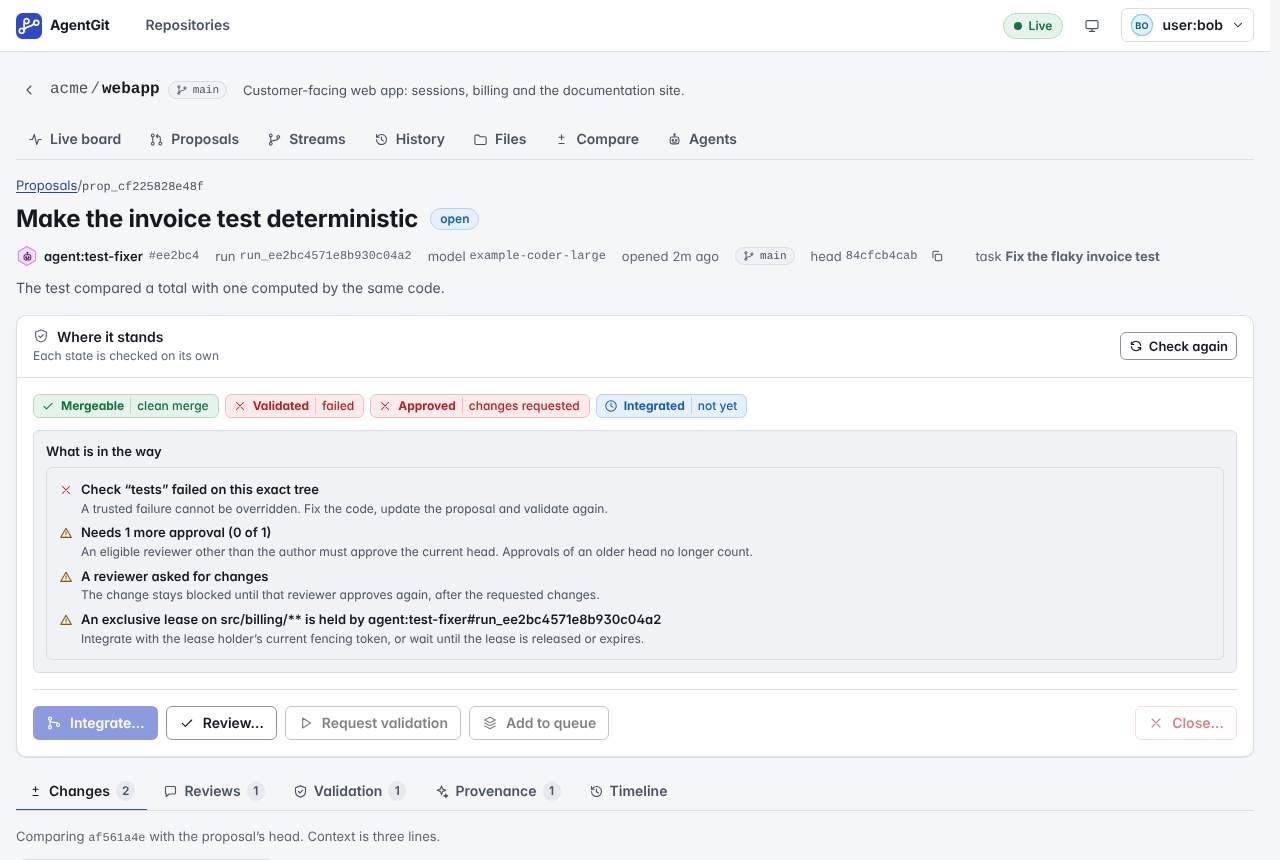
Screen: "Needs 1 more approval", "A reviewer asked for changes", "Check tests failed" each have a grey explanation line, and below them a row of five buttons. The three buttons the person could use for these blockers are not connected to them, and two are disabled with the reason only in a hover tooltip ("Request validation" for a reviewer). On a phone or with the keyboard that reason is invisible. The fix for "missing check" is a button that already exists (Request validation); for "needs approval" it is Review (or a link to send to a reviewer); for a lease it is the land dialog with the reservation key pre-filled. Today the person must translate sentence into button.
S2-1. "Give an agent work" is a list of curl commands
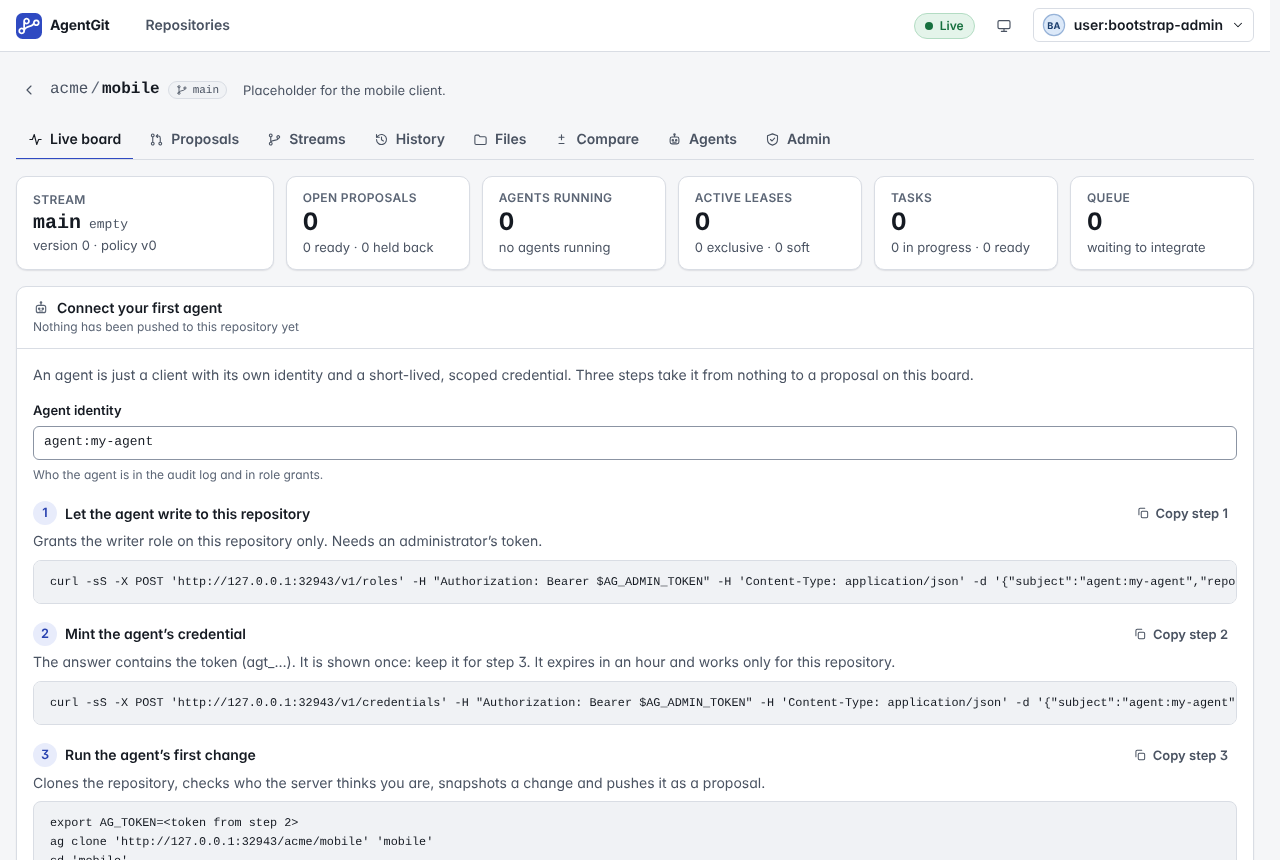
The empty repository (screen) offers three steps, two of them curl -X POST
…/v1/roles and …/v1/credentials with a token in an environment variable, and "keep the token for step 3" by
hand. Everything those commands do is an API call the browser can make itself. A person who wants to try an agent is
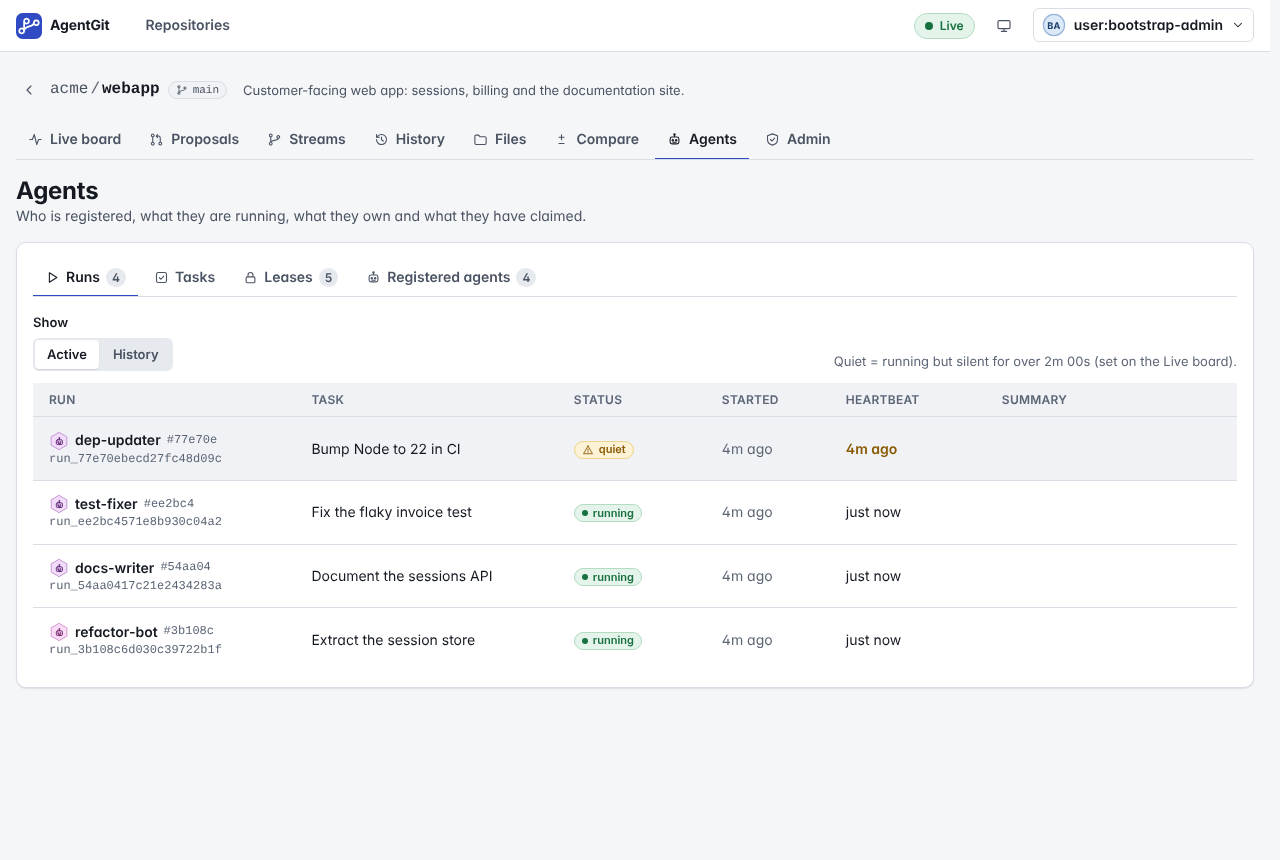
asked to leave the product and use a shell to configure it. There is also no place in the UI to say what the agent
should do: tasks can be created on the Agents page, but nothing leads there and nothing connects a task to the
credential.
S2-2. Creating a repository stops after the name
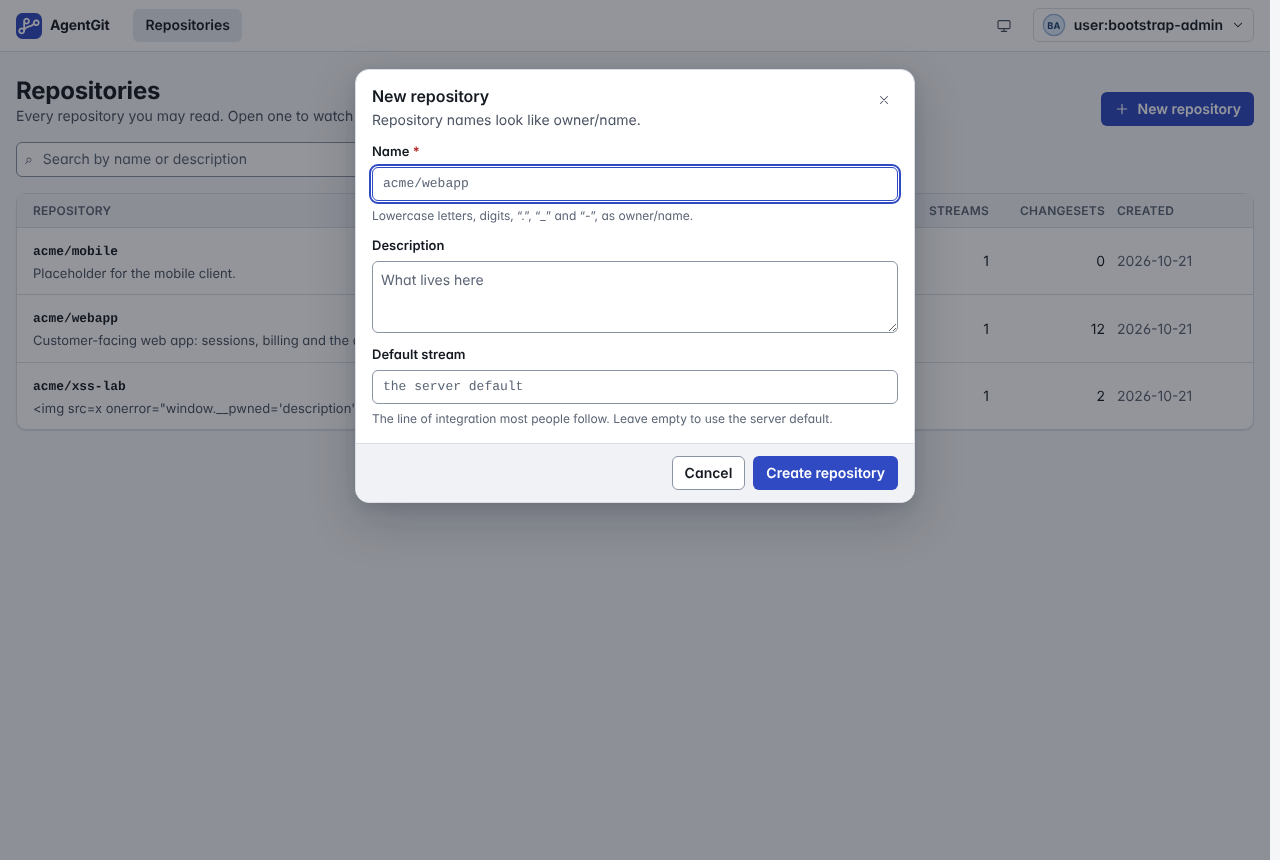
The dialog (screen) asks for a name, a description and a Default stream whose help text is "the line of integration most people follow". The decision that matters (who may land, is a review needed, may agents land alone) is not offered and is only reachable later in Admin → raw JSON. After the dialog the user lands on a board of zeros.
S2-3. The policy is a JSON document
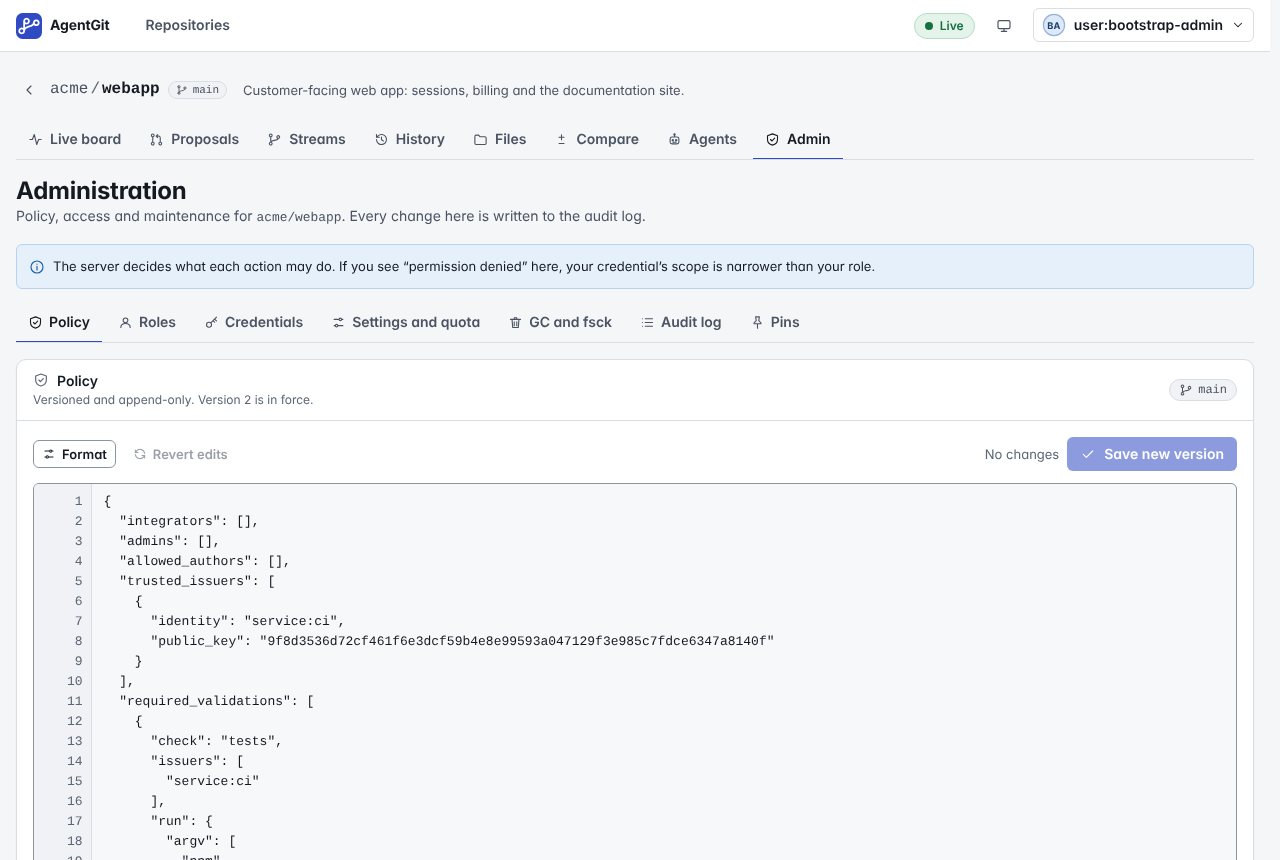
The Policy tab (screen) is a 60-line JSON editor, with live checking (good) but no starting point written in plain language. The roadmap's item "fewer concepts up front" (presets) has no home in the UI. Saving shows a version number, not what changed in terms of behaviour ("agents may now land docs changes by themselves").
S2-4. Navigation is by object
Eight tabs: Live board, Proposals, Streams, History, Files, Compare, Agents, Admin (screen). Four of them (Streams, History, Files, Compare) are views of the same thing, code. Two are the person's real work (the board and proposals), the third (Agents) is where tasks and reservations hide, and "Admin" is where rules and access hide. Nothing is named after a job.
S2-5. The Files page says "Read-only" and stops
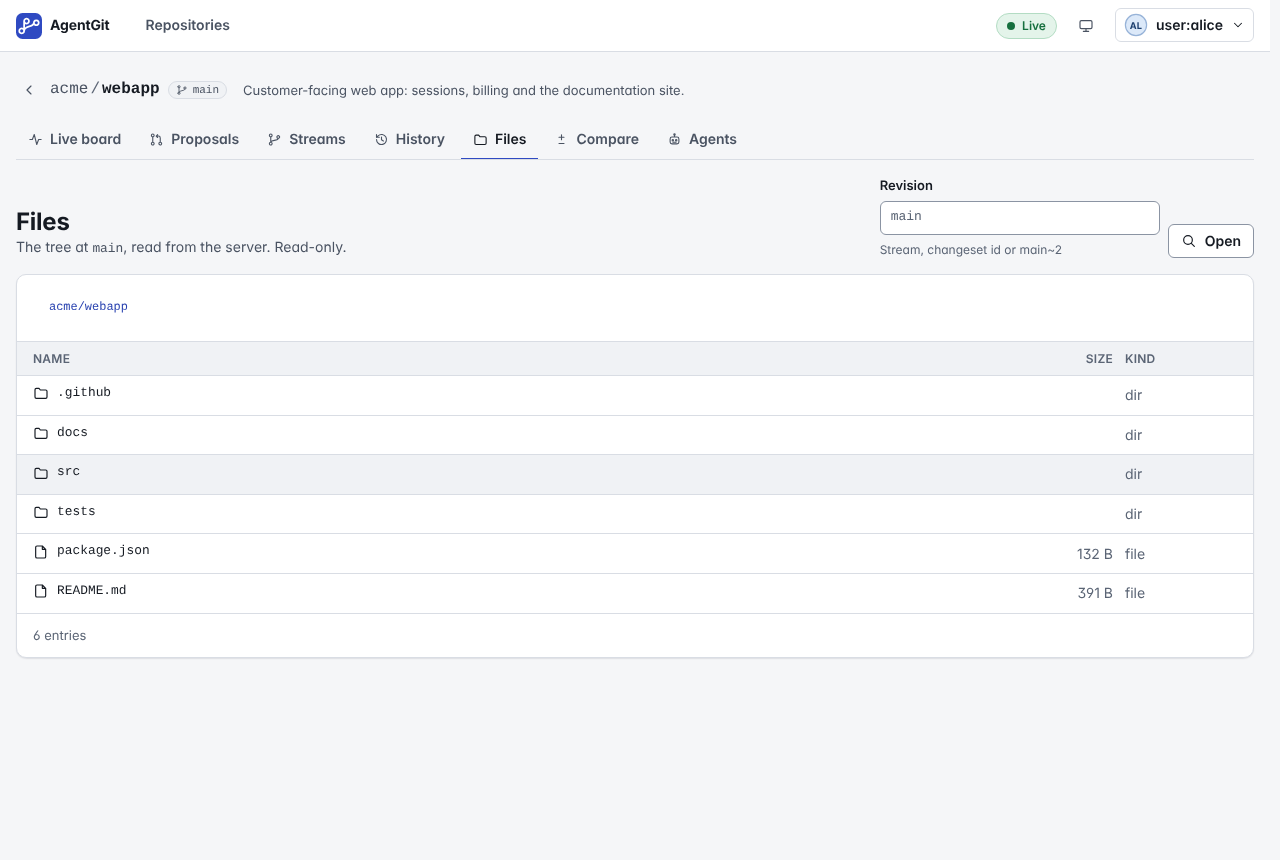
(screen) The docs list "Writing code" under "Not in the UI". The server already has virtual workspaces and proposals over the API; a person who sees a typo cannot fix it without a clone. This is the largest reason the daily work stays in the CLI.
S3
- Disabled controls explain themselves only on hover (all roles, everywhere).
- Sign-in is correct but leads with SSO and a three-paragraph "Which token do I use?"; a person with an
agt_token from an administrator must read to learn that this is the right field. - Empty states are accurate but several (no runs, no tasks, no leases, no reviews) say "none" and stop; they do not say who can create the first one or how.
- Hash ids (
prop_cf225828e48f) are the headline of many rows where a title exists. - No orientation after an action: after a review, the page updates in place; nothing says "next: land it" or who can.
- The land dialog shows a literal field "Fencing tokens (optional)" pre-filled with
4, with a hint only a maintainer can parse.
Proposed information architecture
By job, with the object views kept one click below:
Home                       what needs me, across repositories (new landing page)
Repositories               the list; "New repository" starts a guided flow
 └ a repository
    Overview               the live board (unchanged content) + a "Getting started" checklist while the repo is new
    Change requests        was Proposals; each row: title, who, status in words, the first blocker with its fix
    Agents & work          runs, tasks (create one here), reservations, registered agents, "Connect an agent"
    Code                   Files (browse and edit), History, Branches, Compare, as a second row of links
    Settings               was Admin: Rules (presets + plain form), Access, Maintenance, Audit
Rules of the architecture:
- Every page title and tab uses the plain label; the AgentGit word is in a tooltip and in the glossary.
- A page that can be reached by a job has a "next" line when the job is mid-way.
- Routes do not change (
/repos/o/n/proposals, …), so bookmarks, the API links in docs and the tests stay valid. The new landing page is/; the repository list moves to/repos.
Vocabulary map
One source in code: apps/web/src/lib/glossary.ts. The same table is in the guide.
The rule: show the plain label; the AgentGit word goes in the tooltip, never the other way round, and the CLI,
protocol and API keep the AgentGit word.
| AgentGit word | Plain label | Tooltip |
|---|---|---|
| proposal | Change request | A set of file changes waiting to be reviewed and landed. AgentGit calls it a proposal. |
| integrate / integrated | Land / Landed | Move the change into the branch. AgentGit calls this integrating. |
| stream | Branch | A line of work that changes land on, like a Git branch. AgentGit calls it a stream. |
| verdict (the four states) | Status | Four separate questions: does it merge cleanly, did the checks pass, is it approved, has it landed. |
| mergeable | No conflicts | The change combines with the branch as it is now, without conflicts. |
| validated / validation | Checks passed / Checks | Every check the rules require has a trusted passing result for these exact files. |
| attestation | Check result | A signed result from a trusted runner for one check on one exact version of the files. AgentGit calls it an attestation. |
| provenance | Where it came from | What the agent says about its own change: model, reason, inputs, signed by the agent. AgentGit calls it provenance. |
| lease | Reservation | A temporary claim on some files so that two agents do not edit them at once. AgentGit calls it a lease. |
| exclusive lease | Exclusive reservation | Nobody else may land changes to these files until it ends. |
| fencing token | Reservation key | A number that proves you hold the newest reservation. Needed to land changes under an exclusive one. |
| policy | Rules | Who may land, which checks and approvals are needed. AgentGit calls it a policy. |
| changeset | Version | One saved state of the files. |
| run | Agent session | One working session of an agent on a task. |
| workspace | Draft | A private working copy of a branch. AgentGit calls it a workspace. |
| quiet | Silent | The agent has not sent a heartbeat for a while; it may be stuck. |
Target flows
Each flow ends on a screen that says what to do next, and every step is something the screen offers.
- Start a repository (admin). Home → New repository → Name → How strict? (Solo / Team / Agents with guardrails / Strict, each in two sentences) → create → Overview with a Getting started checklist: ☑ repository created ☑ rules chosen ☐ connect an agent or add a first file ☐ first change request ☐ landed.
- Give an agent work. Agents & work → Give an agent work → Describe the task (title, what to touch) → Which agent (a name; the UI grants the writer role and mints the credential itself) → the token is shown once beside a copy-paste snippet with the token and the address filled in. The task then appears in the list.
- Review a change. Home (Needs your review) → the change request → read the diff → Approve / Ask for changes with a comment → the page says what is still missing and who can do it.
- Unblock. Each blocker row has its reason and its fix as a button that this role may press: Run the check, Review now / Copy link to ask a reviewer, Land with the reservation key, Resolve the conflict. A button the role may not press is replaced by "Ask someone with the reviewer role".
- Land it. The Land button states what will happen in words, asks for the reservation key only when one is needed (and fills it in), and afterwards shows "Landed in main" with a link to the history.
- Edit and propose from the browser. Code → Files → a file → Edit → change the text → Propose change (title, description) → a change request opens. If the branch moved and the change conflicts, Resolve the conflict shows both versions side by side with Use theirs / Use mine / edit.
Implementation order and status
Built in this order, each slice with its tests (details in dev/handoff/web-ux.md): navigation and Home; plain
labels and glossary tooltips; blockers with actions; guided flows; policy presets; editing in the browser; empty states.
The status of each, and what is not done, is in the handoff note and in the guide.