The Web UI
The Web UI is a browser interface to an AgentGit server. It is made for watching and steering agents at work: who is running, who holds which part of the repository, what is waiting for what, and, for every proposal, whether it can land and if not, why, in plain language.
You do not need to know AgentGit's vocabulary to use it: the screens say "change request", "land", "branch" and "reservation", and the AgentGit word is in a tooltip and in Plain words. The first page after signing in is Home, which lists what needs you. The reasoning behind the layout is in the Web UI review.
It is a static app. ag-server serves it; it talks to the server only through the public
HTTP/JSON API, with the same credentials and the same permission checks as any other
client. Nothing in the UI can do what the API would refuse.
Turning it on
ag-server serves the UI itself: the build of apps/web is compiled into the binary (cargo feature ui, on by
default), so one file is the whole product. Release and CI builds run scripts/build_ui.sh (Node 22.18 or newer:
npm ci, a production build, pre-compressed brotli/gzip copies) and then cargo build --release -p agentgit-server. The
container image (deploy/docker/Dockerfile: a Node stage runs the script, the Rust stage embeds its output) is built
that way, and CI checks that the image's server serves the app. The release workflow builds the UI before its
binaries too (and its archive smoke test checks the app is served); that part has not been rehearsed since it was
added. A server built without the UI build still compiles and runs; a browser then sees a page that says how to get the
UI (and API clients keep their JSON 404). If you built the UI by hand after a first cargo build, touch
crates/ag-ui-assets/build.rs (Cargo cannot watch a directory that did not exist yet; build_ui.sh does it for you).
# ag-server.toml
[ui]
enabled = true                  # default; false leaves only the API
# dir = "/srv/agentgit/web"     # serve a copy of apps/web/dist from disk instead of the embedded build
server.web_dir is the old spelling of ui.dir and still works. Open http://127.0.0.1:8080/. Requests under
/v1/ and /agwp., and /metrics, /healthz, /readyz and /openapi.json, always reach the server (a path
under those prefixes that matches nothing is the API's JSON 404, never the page); every other path that is not a
file serves the app, so a bookmarked URL works after a reload. Missing assets are 404s.
Hashed assets are sent Cache-Control: public, max-age=31536000, immutable; the page and everything else is
no-cache with an ETag (304 on revalidation); brotli or gzip is chosen by Accept-Encoding. Every UI response
carries Content-Security-Policy: default-src 'self'; script-src 'self'; style-src 'self' 'unsafe-inline'; img-src 'self' data:;
font-src 'self'; connect-src 'self'; object-src 'none'; base-uri 'self'; form-action 'self'; frame-ancestors
'none' (no inline script and no eval; inline style attributes are allowed because WebKit refuses the app's styles
under a stricter style-src), X-Content-Type-Options: nosniff, Referrer-Policy: no-referrer and
X-Frame-Options: DENY. With redirect sign-in configured, connect-src also names exactly the identity providers'
origins. The UI finds the API on its own origin; nothing is configured.
To try it without setting anything up, npm run demo:server in apps/web starts a throw-away server with a
realistic team and four agents, and prints a token for each of them (see the
developer README).
Signing in
A sign-in link (ag-server dev). The evaluation server prints a link such as
http://127.0.0.1:8080/repos/demo/welcome#token=agt_…. The credential is in the fragment, the part of a URL after #,
which a browser never sends to a server: it is in no access log and no Referer (the server also sends
Referrer-Policy: no-referrer). The UI reads it before anything else runs, removes it from the address bar and from the
page's history entry (history.replaceState), checks it with the server like a pasted token, keeps it in the tab's session
storage like one, and opens the page the link names without the "You are signed in" step. A link that does not work (for
example the one from before a restart) is explained on the sign-in page, and nothing is stored. The trade-offs, which is why
this is for evaluation only and the credential ag-server dev issues lives eight hours and is replaced at every start:
- whoever can see the terminal (or its scrollback) where the link was printed can use it until it expires;
- the browser's own history database may keep the address as it was before the page loaded and removed the fragment;
ag-server dev --openpasses the link to the browser as a command-line argument, so any user of the same machine can read it in the process list for a moment;- it is plain HTTP on the loopback interface, so nothing crosses a network, and the link is useless from another machine.
A production server uses single sign-on or a token you paste, and never prints a link. The link is not a general feature: only
the #token= fragment is read, and only when the page loads.
Single sign-on (redirect). When the server lists an identity provider, the sign-in page offers "Sign in with
state and nonce checked by the browser, then the
code is exchanged at the provider's token endpoint. The server still verifies every token with the provider's keys
(GET /v1/auth/config, public, tells the UI which providers exist; see the protocol).
[[auth.oidc]]                                  # makes the server accept the provider's tokens
issuer = "https://idp.example.com/realms/acme"
audience = "agentgit-web"                      # = the UI's client_id when the ID token is presented
group_roles = [{ group = "platform", role = "admin", repo = "acme/*" }]
# http_timeout_secs = 10        # discovery and key-set requests to the provider
# jwks_refresh_secs = 30        # an unknown signing key refreshes the key set at most this often
# jwks_max_age_secs = 3600      # how long fetched keys are trusted
# leeway_secs = 30              # clock skew tolerated for exp / nbf

[[ui.login]]                                   # makes the UI offer the button
issuer = "https://idp.example.com/realms/acme"
client_id = "agentgit-web"                     # a public client; redirect URI: <UI origin>/auth/callback
# scopes = ["openid", "profile"]; token = "id_token" | "access_token"
# authorization_endpoint / token_endpoint / end_session_endpoint: otherwise read from discovery
The provider must allow requests from the UI's origin (CORS) on its discovery and token endpoints. If its token
endpoint is on another origin than the issuer, set token_endpoint so the Content-Security-Policy can allow it.
Trade-off, on purpose: the token is kept in memory only, never in localStorage or sessionStorage (only the
short-lived PKCE/state/nonce survive the redirect, deleted when the callback is handled). So a script injected into
the page cannot read a stored credential, but a reload (or a second tab) asks the provider again, silently
(prompt=none: instant while the provider's own session lives, otherwise you are asked to sign in). A refresh token,
when the provider issues one, renews the session silently a minute before expiry; without one you are warned and
the session ends at expiry with an explanation. Signing out also ends the provider's session when it offers a
logout endpoint. Redirect sign-in needs a secure context (HTTPS or localhost) for PKCE.
Paste a token. Still available next to it, and the way for scoped credentials: agt_… tokens minted by an
administrator (POST /v1/credentials, or Admin → Credentials), an OIDC ID or access token, or the bootstrap token.
A pasted token stays in this tab's session storage (closing the tab signs you out), is sent only in an
Authorization header and never appears in a URL. If a credential expires or is revoked while you work, the session
ends with an explanation instead of a page full of errors.
Home: what needs you
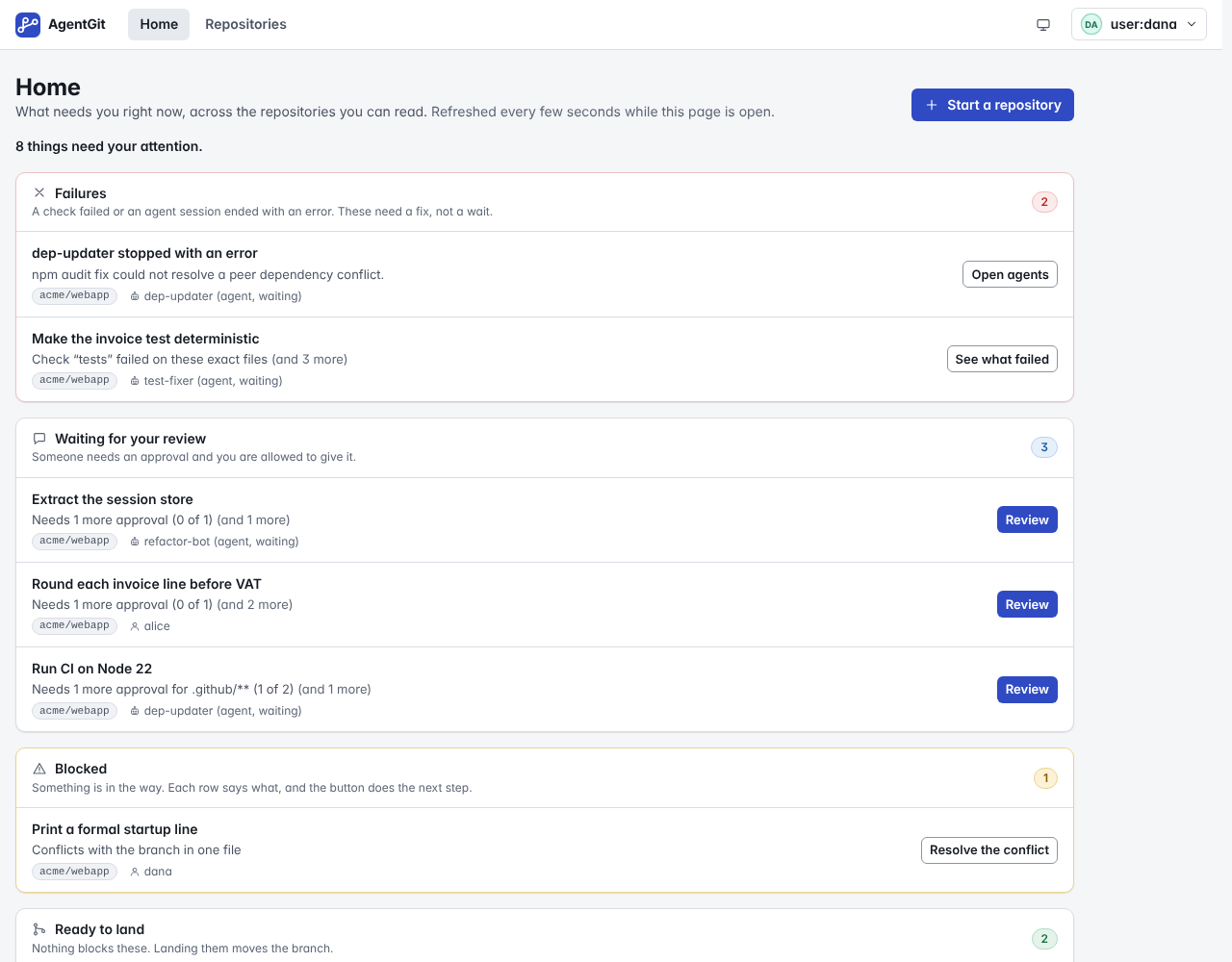
The first page after signing in. Across the repositories you can read (the 30 newest), it lists, most urgent first:
- Failures: a required check failed, or an agent session ended with an error in the last day.
- Waiting for your review: changes that need an approval you are allowed to give (not your own, not already decided).
- Blocked: every other change that cannot land, with the first reason in a sentence and a button for the next step (open it, run the check, land with the reservation key, resolve the conflict).
- Ready to land: nothing in the way, and you may land it.
- Agents gone silent: sessions that are running but have not reported in.
Each row says which repository, who (and whether it is an agent waiting), and for how long. Opening a row's button takes you to the change request with the review or land dialog already open; it never starts work by itself (running a check is one click further, on the page). Home is re-read every 15 seconds while it is open, not live, because it spans many repositories. With nothing to do it says so and suggests where to go; without any repository it says how to get one.
Finding your way
Inside a repository the navigation is by job: Overview (where things stand), Change requests (the work to review), Agents & work (give an agent work, sessions, reservations), Code (Files, History, Branches, Compare as a second row) and, for administrators, Settings (rules, access, maintenance). Routes are unchanged, so old links work.
The overview of a repository
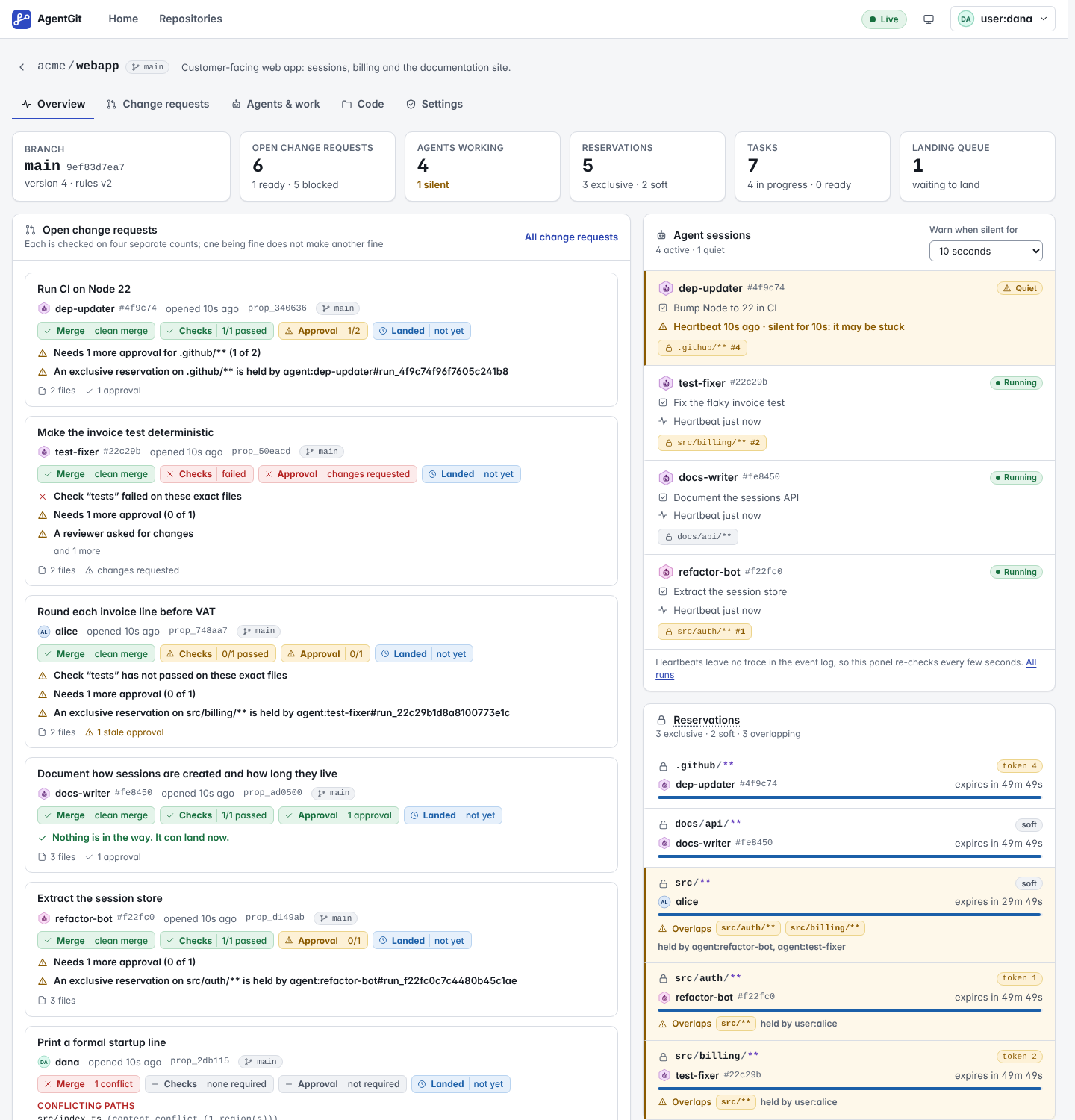
Open a repository and you land on its board. It follows the repository over a live event stream; the indicator at the top right says whether it is Live, Reconnecting (it retries with backoff and catches up on what it missed) or has lost access.
- Agent runs. Each active run with its task, how long ago it last sent a heartbeat, and the leases it holds. A run that has been silent for longer than a threshold you choose (the selector on the panel) is marked Quiet with how long it has been silent. That is a hint that an agent may be stuck, not a verdict.
- Lease map. Every active lease: its path scope, whether it is exclusive or soft, the fencing token an integrator must present, and a countdown. Leases whose scopes may overlap are called out together with who holds them.
- Open proposals. One card per proposal, with the four independent verdicts and the first blockers (below).
- Tasks and dependencies. The task graph: what is in progress, what is blocked and by which tasks, what is done.
- Integration queue and conflict predictions. What is waiting to be integrated, and where open proposals, leases and the stream itself are about to collide: two proposals editing the same files, a proposal editing files inside someone else's exclusive lease, a stream that moved under a proposal.
- Activity. The event log as sentences ("
alicetook a soft lease onsrc/**"), newest first. Housekeeping events are hidden unless you ask.
Agent heartbeats and lease expiry do not appear in the event log, so those two parts re-check every few seconds (the page says so).
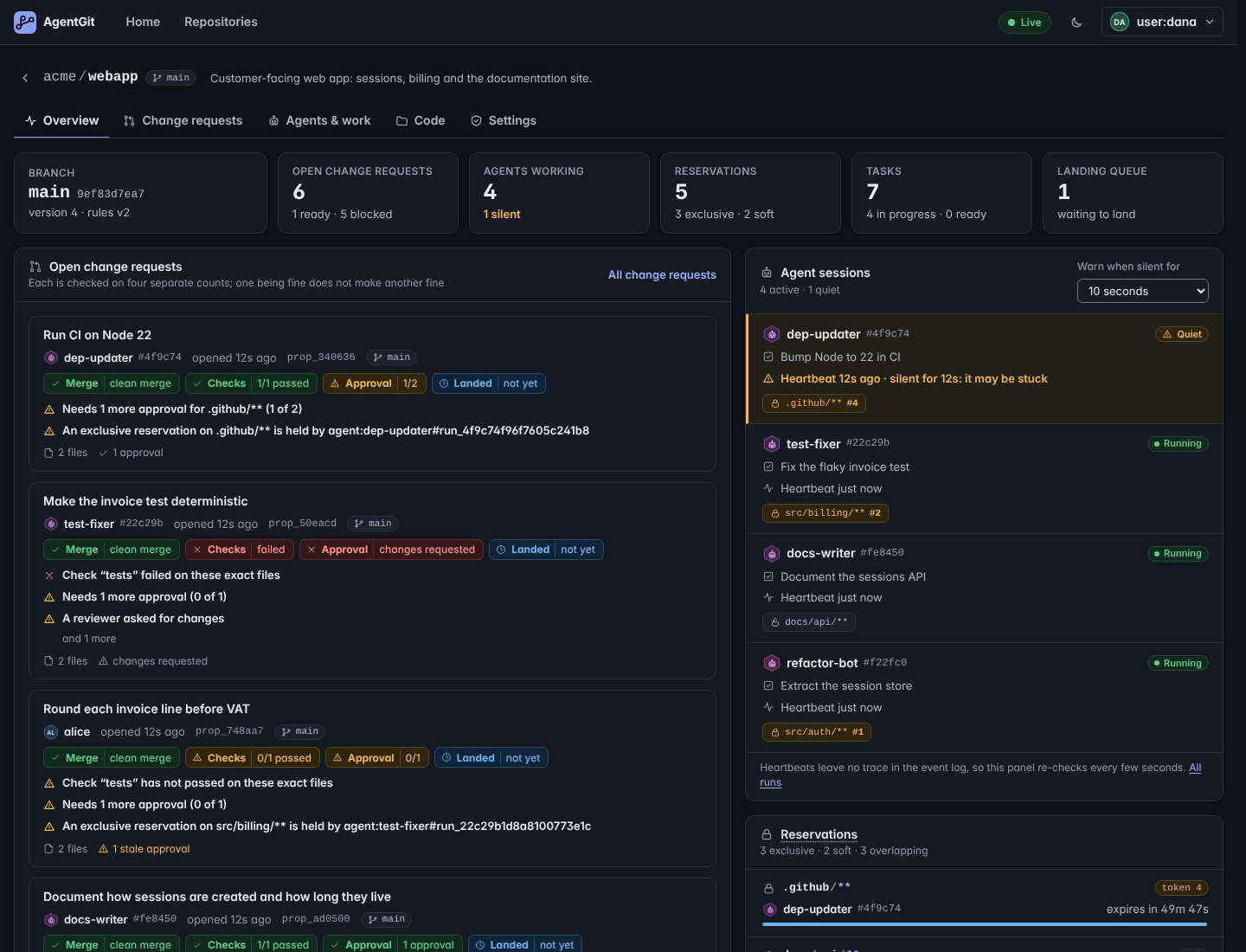
A dark theme is available from the toggle in the header; by default the UI follows your system.
A change request
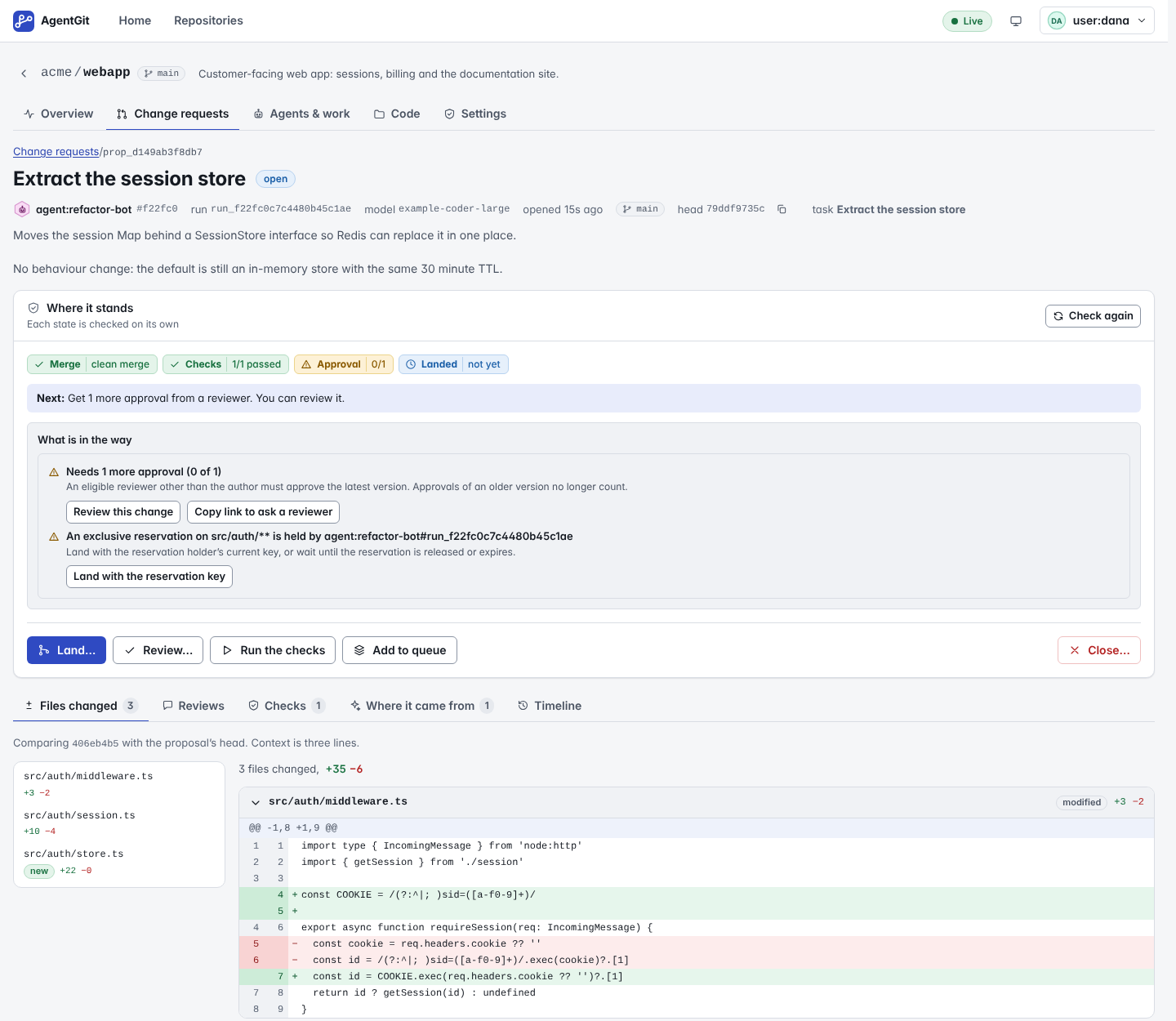
The header names who proposed it. For an agent's change it shows the run, the model and the task behind it (from the agent's signed provenance record).
Four independent states. A change is not "ready" or "not ready"; four separate things can each be true or false:
| State | Question it answers |
|---|---|
| Mergeable | Does the change combine with the stream's current head without conflicts? |
| Validated | Does every check the policy requires have a trusted passing result for this exact tree? |
| Approved | Does it have the approvals the policy asks for, of its current head? |
| Integrated | Has it landed? |
They are shown separately because they change for different reasons: approving a proposal does not make it
mergeable, a moved stream changes the tree that must be validated, and pushing a new commit makes earlier approvals
stale (they are listed as stale, not counted). When something is in the way, What is in the way lists each blocker in
plain language with what to do about it, for example "An exclusive lease on src/auth/** is held by
agent:refactor-bot. Integrate with the lease holder's current fencing token, or wait until the lease is released or
expires."
Tabs. Changes is the diff (files, hunks, line numbers; binary files are named, not shown); Reviews shows each decision with the head it looked at; Validation shows each required check, the job that ran it and the signed attestation (who signed, for which tree, under which policy version, in which environment); Provenance shows what the agent said about itself (rationale, inputs, parameters), always as untrusted text, with whether the signature verified; Timeline is the history of the proposal.
Actions are Review, Run the checks, Land, Add to queue and Close. Each is enabled only if your roles allow it; the buttons that are off are explained in words under the row ("Land: requires the integrator role"), not only in a tooltip. A Next: line picks the one thing to do first (a conflict before checks, checks before approvals).
Every blocker has its fix next to it. Run the check runs the missing check; Review this change opens the review dialog (not offered to the author); Copy link to ask a reviewer; Land with the reservation key opens the land dialog; Resolve the conflict opens the resolver (below). A fix is a button only when your role allows it. Otherwise the row says who to ask ("Ask someone with the reviewer role") instead of showing a button that would fail. Integrate shows the strategy (fast-forward or merge), asks for fencing tokens when a lease is involved, and reports the outcome the server decided: integrated, blocked (nothing changed, with the blockers), conflict (with the paths) or refused by policy.
Branches and history
- Branches lists branches (streams) with their heads and the policy version in force, and the reflog, the append-only record of every move of a head.
- History shows the changesets of a stream as a graph; merge commits show their parents. Opening a changeset shows its message, files and the diff it made.
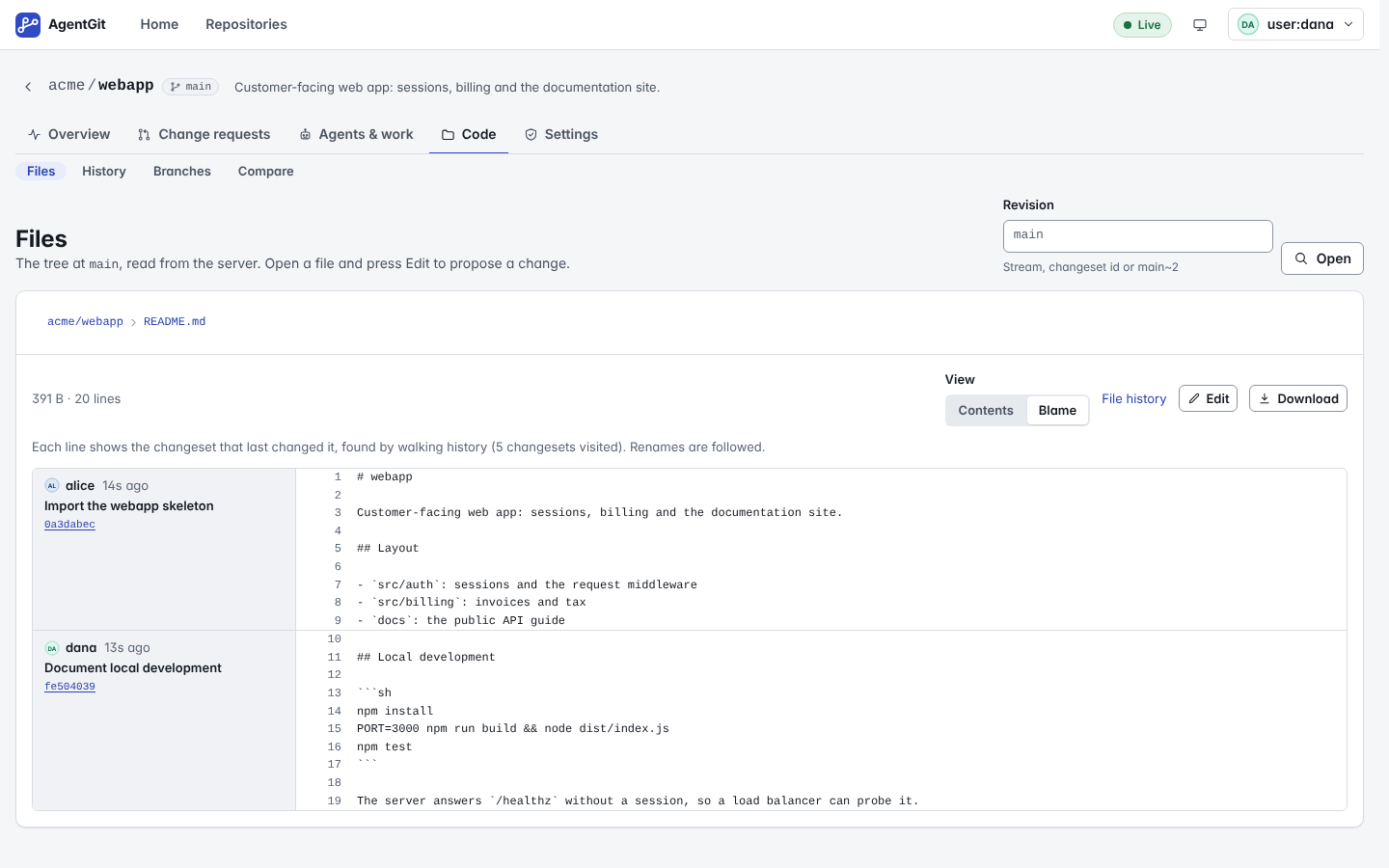
- Files browses the tree at any revision, with file sizes, and shows files as text. A Blame switch shows, for each line, the changeset, author and time that last changed it (renames are followed; lines whose origin is further back than the server looked are marked older than shown). If a server does not offer blame, the page says so.
- Compare shows the diff between any two revisions (
main~3andmain, two changeset ids, ...).
Agents & work
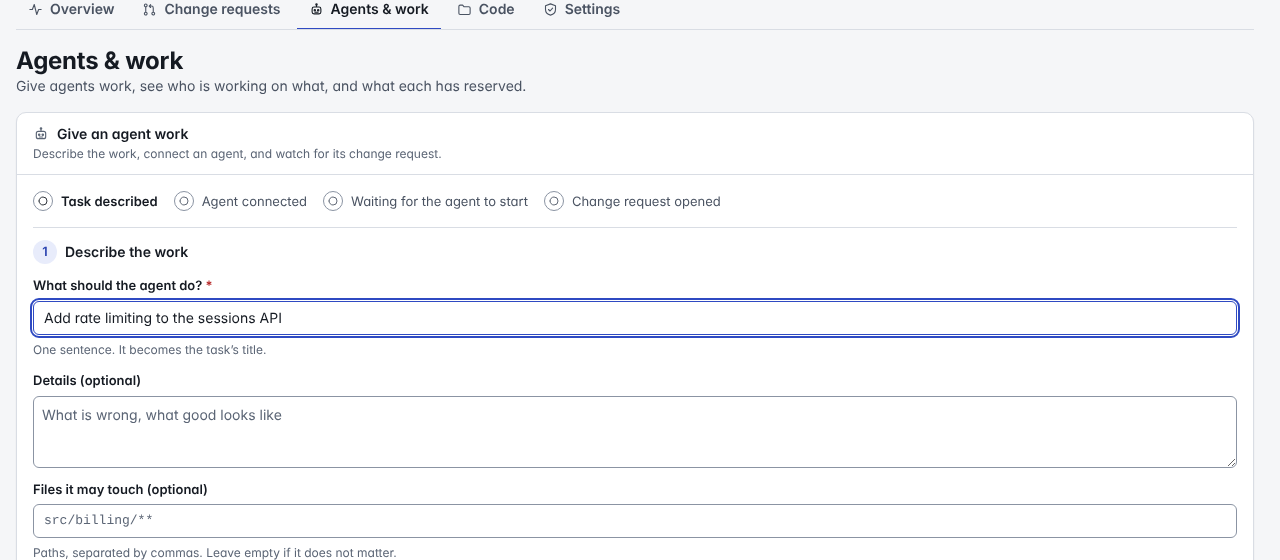
At the top, Give an agent work walks the whole job with a progress list: describe the task (what to do, which files), connect an agent (the page grants the writer role on this repository and mints a one-hour credential scoped to it, which needs the admin role), then copy the commands or the plain-words instruction it shows (the credential is displayed once and can be hidden). It then watches for the agent to start and for its change request, and links to it. The older command-line-only version is under Prefer the command line only?
Below: Agent sessions (active, or the history of finished ones with their summaries), Tasks (a board by state, with what each is waiting for), Reservations, and Registered agents with their identities and public keys.
Administration
Visible only where you hold the admin role; anyone else sees what the page needs instead of controls.
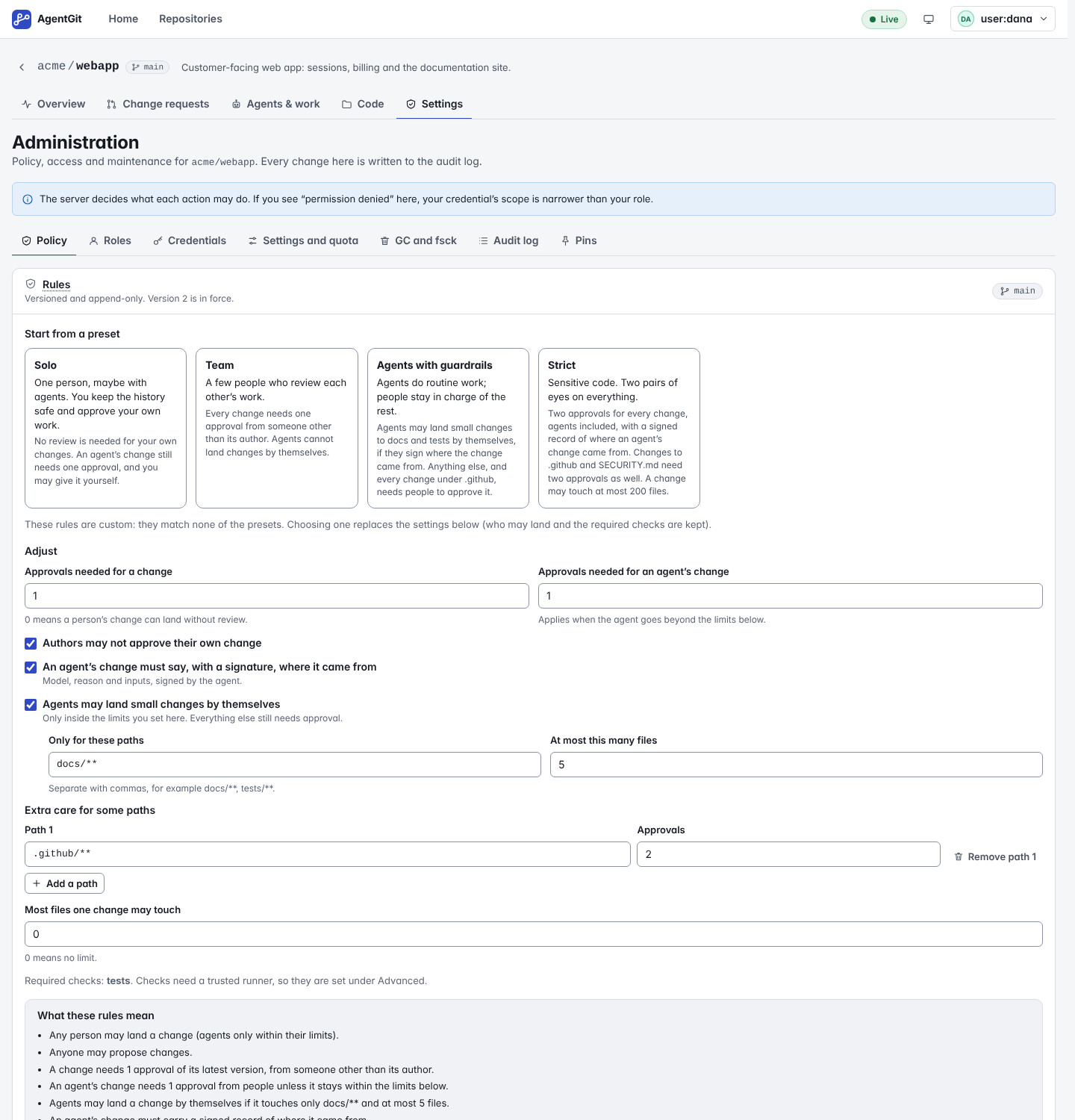
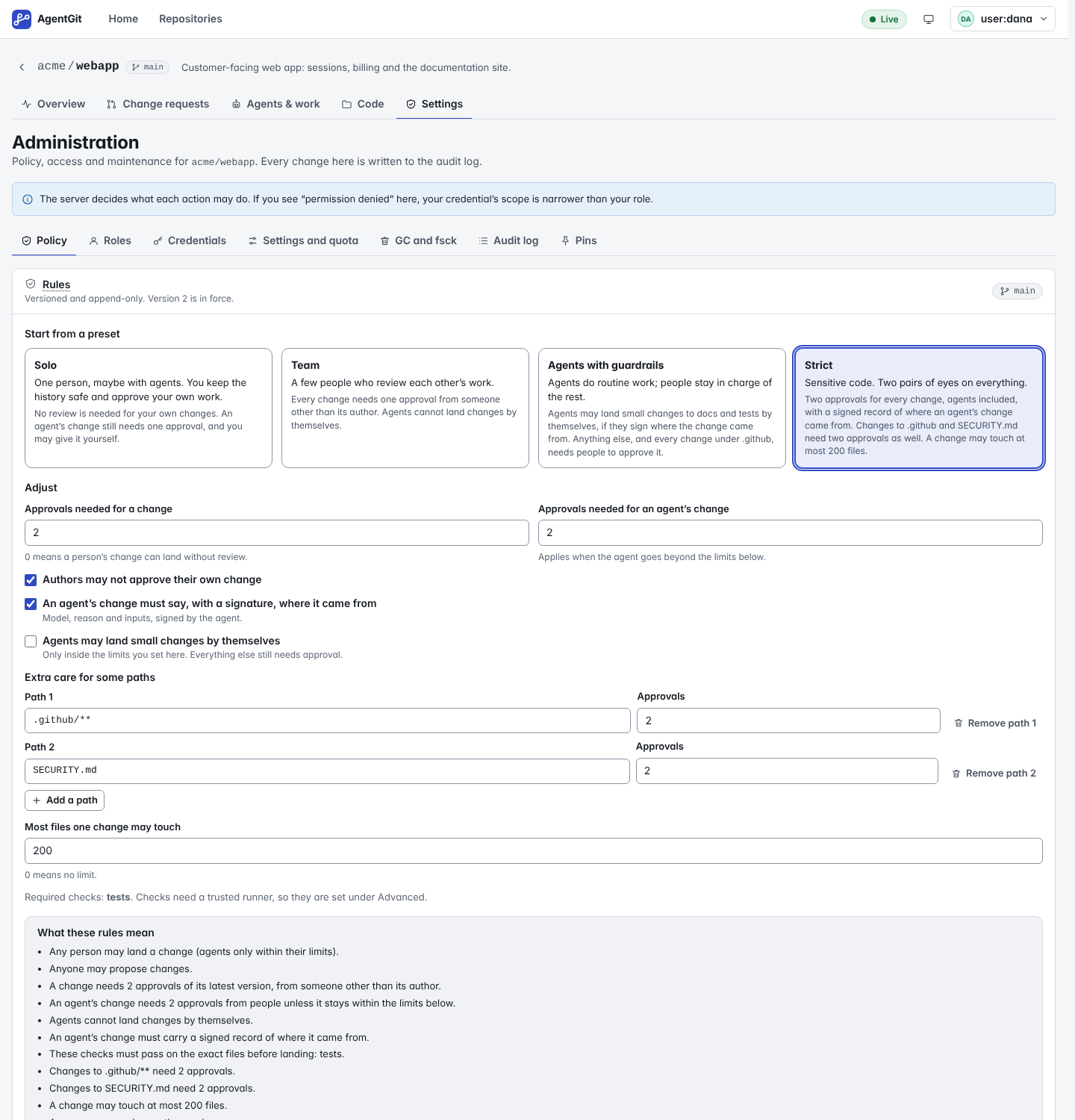
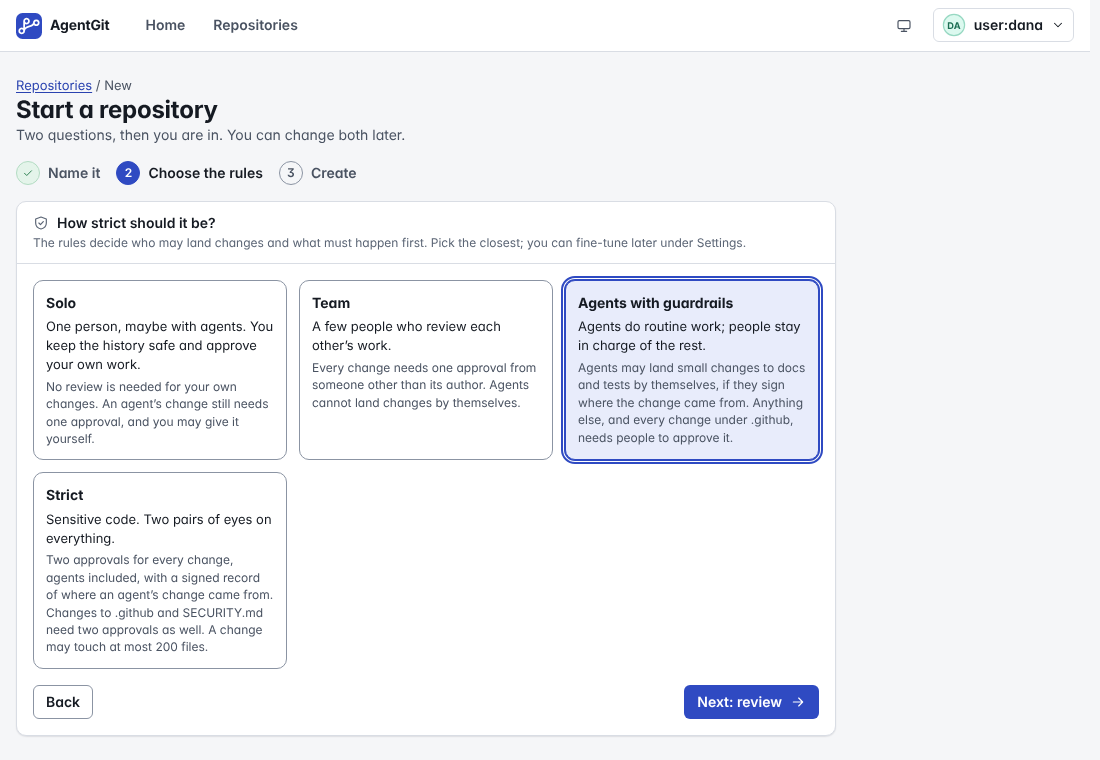
- Rules. Start from a preset (Solo, Team, Agents with guardrails, Strict, each described in two sentences) and adjust plain fields: approvals needed for a person's and for an agent's change, whether authors may approve their own, whether agents may land small changes by themselves (and for which paths and how many files), whether an agent's change must say where it came from, extra care for some paths, a file limit. A preset keeps the checks, trusted runners and who-may lists the branch already has. Under the fields, What these rules mean is the document in sentences, and once you change something, What saving this changes lists what it now allows and asks for more of ("Landing now needs 2 approvals (was 1)", "Agents may now land changes by themselves when…"). The form edits the same JSON the server stores; the raw document stays under Advanced, with checks while you type (JSON errors, unknown fields with a suggestion, settings that can never be satisfied), and the server's own refusal is shown verbatim if it still rejects the document. Required checks are shown but added under Advanced (they need a trusted runner). The older text: an editor for the stream's policy with checks while you type (JSON errors, unknown fields with a suggestion, settings that can never be satisfied), the server's own refusal shown verbatim if it still rejects the document, and a version history with a diff between any two versions. Saving creates a new version. Attestations made under an older version stop counting, on purpose, and the UI says so.
- Roles and Credentials. Grant and revoke roles. Mint tokens for yourself, or, as an administrator, for an agent or service, optionally limited to repositories, streams or operations. A new token is shown exactly once: in full, selected and with a copy button (and a button to hide it), and gone from the page when you close the dialog. The server keeps only a hash, so it cannot show it again.
- Settings and quota, GC and fsck (garbage collection always starts as a dry run; the real run is only offered after one, behind a confirmation), Audit log (filterable, with a button that verifies the hash chain) and Pins.
Keyboard, accessibility and small screens
Everything works without a mouse: a skip link, one tab stop per tab list with arrow keys, dialogs that trap focus and give
it back, a visible focus ring everywhere, and screen-reader announcements for route changes, toasts and the live
indicator. State is never colour alone: states have icons and words, diffs have +/−. The UI follows your system's
colour scheme and prefers-reduced-motion. Below 820 px wide (or on a touch screen) every control is at least 44 px and
the header, tab strips and tables adapt: tables that do not fit scroll sideways as a labelled region the keyboard can reach.
First run, version check, ended sessions
- Connect your first agent. A repository nobody has pushed to (the server reports zero changesets, no open
proposals) shows a panel with three steps and this server's address and repository filled in: grant the agent a role,
mint its credential, run
ag clone/ag snapshot/ag pushwith it. The commands are built insrc/lib/onboarding.tsand the end-to-end test takes them from the page and runs them with the realcurland the realagagainst the real server (e2e/onboarding.spec.ts); the proposal the agent pushes then appears on the board. An agent identity that could not be put safely into a shell line is refused instead of printed. - Version banner. The build writes its version (
apps/web/package.json, kept equal to the workspace version by a Rust test) toui-version.json; the page compares it withserver_versionfromGET /v1/capabilitiesat start, when the tab becomes visible again and when the browser comes back online. A different major or minor version, or a protocol other thanagwp.v1, shows a banner with a Reload button (e2e/version.spec.tsserves a copy of the build with another version from a second real server). - Session ended. A 401 while you work (or a credential that ran out) leads to
/unauthorized: it says the session ended, shows what the server answered and its request id, and leads to the sign-in with the way back.
Verified where
| Claim | Evidence |
|---|---|
A first-time user does each job using only what the screen offers: start a repository, give an agent work (the commands are taken from the page and run with the real ag), review, unblock, land; edit a file and propose; resolve a conflict; choose rules |
e2e/jobs.spec.ts |
Whole end-to-end suite (about 300 tests) against a real ag-server with the UI embedded |
CI job "end-to-end (chromium)" |
| Same suite in Firefox and WebKit | CI jobs "end-to-end (firefox)", "end-to-end (webkit)"; engine differences, if any, are named in the spec that handles them |
| Layout and axe at 768 and 390 px | CI jobs "tablet", "phone" (Chromium with touch emulation, not a real device) |
| axe (WCAG 2.x A/AA + best practice), light and dark, every main screen, dialogs, error pages | accessibility.spec.ts; the scroll-region race that once made it flaky is pinned by scrollregion.spec.ts |
| Redirect sign-in against a real identity provider (Keycloak, pinned image): login, groups to roles, silent re-authentication, token expiry after the provider revoked the session, sign-out at the provider | CI job "real identity provider (Keycloak)", e2e/keycloak.spec.ts |
| The server's own OIDC validation with tokens Keycloak issued (discovery, signature, audience, expiry, tampering) | same job, crates/ag-server/tests/oidc_keycloak.rs (--ignored) |
| Failure modes a real provider will not produce on request (wrong state, bad nonce, forged signature, denied) | e2e/oidc.spec.ts with the fake provider e2e/support/idp.ts, and crates/ag-server/tests/security.rs: test doubles, in test code only |
Not verified: a pass with a real screen reader (NVDA, VoiceOver, TalkBack) and keyboard-only use on real devices; real phones; identity providers other than Keycloak (Entra, Okta, Auth0). Automated checks find only part of the problems. There is no command palette. Known minor issues: the tab strips of a repository have no scroll hint other than the cut-off tab; the diff and blame views are read-only on a phone (they scroll sideways inside their own box).
Security notes
- Everything the server sends is treated as untrusted text: proposal titles, descriptions, review comments, task and
run summaries, file names and contents, diffs, and what agents write about themselves. It is only ever shown as text. The
code base forbids HTML injection (
v-html,innerHTML,eval, inline handlers) by lint rule and by test, and the end-to-end suite seeds a repository full of hostile markup and checks that none of it runs. - Content-Security-Policy. The UI needs nothing outside its own origin (no CDN, no web fonts, no inline scripts), so the server's strict policy applies in full.
- Tokens live in the tab's session storage and in an
Authorizationheader only; they are never written to local storage, a log or the page after the one-time reveal, and never sent in a URL. The one place a token arrives in a URL is the fragment of the sign-in link ofag-server dev(see "Signing in"), which is cleared at once. - Permissions shown in the UI come from your roles and are a convenience. The server decides, and refuses anything you may not do whatever the page offers.
- Same origin. The UI is served by the server it talks to, so no CORS configuration is needed. If you serve it from
elsewhere, list that origin under
cors_originsin[server]and keep the same CSP.
Start a repository
Administrators: Start a repository (on Home and on Repositories) is three steps with a progress list: name it (the page explains what a name looks like before anything is sent), choose the rules (the four presets), review what the choice means in sentences, create. The rules are stored with the repository. The new repository's overview shows a Getting started checklist (repository created, rules chosen, work started, a change request open, first change landed) that ticks itself and offers the button for the next step.
Edit a file and propose a change
With a writing role, a file on a branch has an Edit button and a directory has New file. Propose change asks for a title and description and opens a change request; nothing lands until it is reviewed and landed like any other. This uses the server's virtual workspaces: a draft is opened on the branch (from exactly what was on screen), the edit is applied as one version, the change request is opened from it, and the draft is removed. Only text files can be edited; renaming and deleting files, and several files in one change, are not in the browser yet.
Resolve the conflict. When a change request no longer merges with its branch, its author sees Resolve the conflict (everyone else sees Copy link to send to the author). The resolver shows, per file, the branch's version and yours, with Keep the branch's, Keep mine, Delete the file and a text box for the result. Saving applies the resolutions through the draft and moves the change request to the merged version. Conflicts that are not about text (binary files, renames, type changes) say to use the command line.
Plain words
The screens use the left-hand label; the AgentGit word is in the tooltip. The CLI, the protocol and the API keep the
AgentGit words. This table is generated from apps/web/src/lib/glossary.ts (a test fails if they drift apart).
| AgentGit word | Plain label | Meaning |
|---|---|---|
| proposal | Change request | A set of file changes waiting to be reviewed and landed. |
| integrate | Land | Move the change into the branch. |
| integrated | Landed | Has the change been moved into the branch? |
| stream | Branch | A line of work that changes land on, like a Git branch. |
| verdict (the four states) | Status | Four separate questions: does it merge cleanly, did the checks pass, is it approved, has it landed. One being true does not make another true. |
| mergeable | Merge | Does the change combine with the branch as it is now, without conflicts? |
| validated | Checks | Has every check the rules require passed, with a trusted result for these exact files? |
| approved | Approval | Does the change have the approvals the rules ask for, from reviewers who looked at its latest version? |
| validation | Check | A test or other check the rules require before a change may land. |
| attestation | Check result | A signed result from a trusted runner for one check on one exact version of the files. |
| provenance | Where it came from | What the agent says about its own change: model, reason and inputs, signed by the agent. Treat it as a claim, not a fact. |
| lease | Reservation | A temporary claim on some files so that two agents do not edit them at once. |
| exclusive lease | Exclusive reservation | Nobody else may land changes to these files until it ends or is released. |
| fencing token | Reservation key | A number that proves you hold the newest reservation. Landing a change under an exclusive reservation needs it. |
| policy | Rules | Who may land changes to a branch, and which checks and approvals are needed first. |
| changeset | Version | One saved state of the files. |
| run | Agent session | One working session of an agent on a task. |
| workspace | Draft | A private working copy of a branch, where edits collect before they are proposed. |
| quiet (stale heartbeat) | Silent | The agent has not reported in for a while. It may be stuck; this is a hint, not a verdict. |
Not in the UI
- A full editor. Editing is one text file at a time; for more, use a clone, a workspace through the CLI, or the SDKs.
- Email or chat notifications. The board is live while it is open.